Desk planning
Will a Desk Mat Leave Enough Room to Move Your Mouse?
Measure the mat outline, keyboard footprint and actual mouse movement zone before choosing a size.
Example: a desk mat is 80 × 30 cm. Your keyboard is 44 cm wide, the measured mouse zone is 22 cm wide and you want 4 cm between them. The front row needs 70 cm, leaving 10 cm across the mat for outer margins. That spare width does not tell you whether the mouse has enough depth or whether the whole mat fits the desk.
Measure the movement you use
Place your existing keyboard and mouse where you normally work. Perform ordinary tasks: select text, move between windows and reach the corners of the screen. Mark the area used by the mouse without changing your settings simply to make a small rectangle work. Include cable movement if the mouse is wired.
Measure the width and depth of that area. The mouse body itself is only part of it. If you regularly lift and reposition the mouse, include the usable space where you set it down. Different tasks may need different movement; repeat the check for the work you actually expect to do.
Compare the mat and the front row
Record the exact mat's outer dimensions, including any border. Make a paper outline on the desktop. Place the keyboard footprint and mouse zone inside it, then decide where the remaining margin goes. A raised edge or an object resting on the mat may reduce the area you can use for movement.
- Measure the clear desktop where the mat will lie.
- Mark the proposed mat outline without allowing it to hang over the edge.
- Position keyboard and mouse zones with the chosen gap and outer margins.
- Test the full mouse movement while keeping the keyboard in its working position.
Example: if you center the 70 cm front row on the 80 cm mat, the outer margins are 5 cm on each side. A 24 cm deep mouse zone on a 30 cm deep mat leaves 6 cm total in front and behind. Those margins are arithmetic from the example, not recommended ergonomic dimensions. Allocate them according to the placement you can actually use.
Check the full desktop separately
OSHA advises keeping the mouse close to the keyboard. A wider mat is not a reason to move the mouse farther away. If the proposed arrangement pushes your mouse away to avoid a monitor stand or other obstacle, move the obstacle and test again.
Use the desk-layout guide to compare the monitor and front row with the desk. The calculator's gap is used between keyboard and mouse and between rows; it does not add every mat-edge margin. Check those margins on your paper outline. A mat fitting inside the desktop does not prove the equipment layout fits.
Buying nothing may work: clear the mouse area, keep your existing mouse pad or place the keyboard directly on the desk. If the current surface lets you perform the required movement, an oversized mat is optional. If you change keyboard size later, use the keyboard measurement guide and repeat the front-row check.
Sources
OSHA: Pointer/Mouse supports keeping the mouse near the keyboard. Mat dimensions and margins here are hypothetical examples.
One product to check
As an Amazon Associate I earn from qualifying purchases. Links marked “Amazon” are affiliate links.
Start with what you own and the measurements above. This option is based on published specifications, not hands-on testing. Check the exact variant and current availability before ordering.
Logitech Desk Mat Studio Series — Lavender
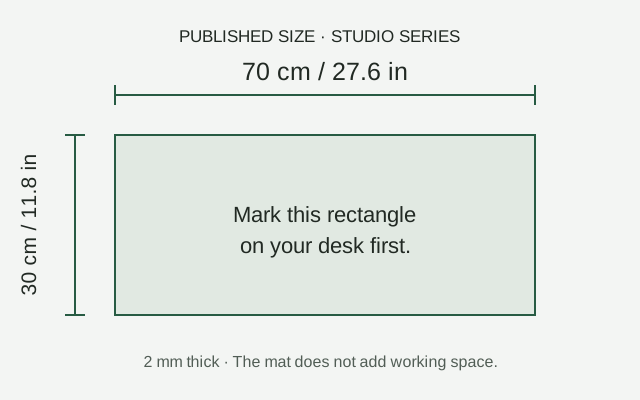
Published Studio Series size: 70 × 30 cm, 2 mm thick.
An option if the clear desktop accommodates a 70 × 30 cm rectangle while preserving your measured keyboard and mouse zones.
Before ordering: Mark the rectangle on your desk before ordering. A mat does not add working space. The base contains natural rubber latex; check material suitability and the listed variant.
More desk layout guidance
Will Your Monitor, Keyboard and Mouse Fit Your Desk?
What Should You Measure Before Buying a Wider Keyboard?
What Should You Check Before Adding a Monitor Arm to a Small Desk?